


 Valheim
 A Valheim player ID is what you put in adminlist.txt, permittedlist.txt, and bannedlist.txt, and what the /ban, /kick, and /unban commands accept.
What the ID looks like
Since Valheim 1.0, a player ID is a platform prefix followed by that platform’s account ID. For a Steam player it is V_ followed by their 17 digit SteamID64, for example:
V_76561198012345678Players on other platforms have a different prefix. Whatever it is, use the ID exactly as Valheim shows it, including the prefix.
Method 1: In-game F2 player list (recommended)
This is the easiest way and works for anyone currently connected.
- Have the player join your server.
- While connected, press
F2to open the player panel in the top left. - In the
Playerssection at the bottom, find the player by name. Their Valheim player ID is shown next to it. - Copy the ID exactly, including the
V_prefix. Player IDs are case sensitive.
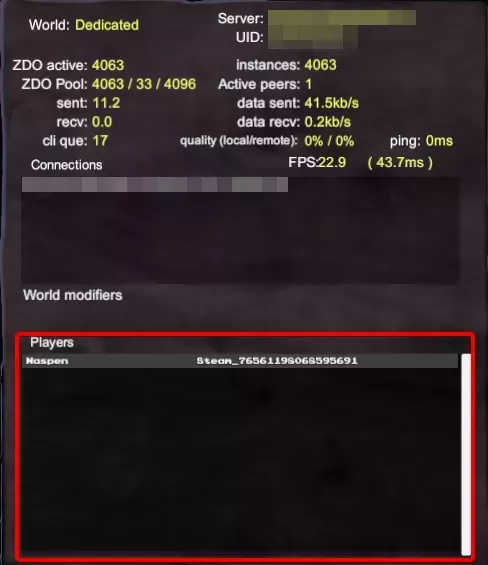
Any admin on the server can read another player’s ID this way, so the player whose ID you need does not have to check it themselves.
Method 2: Server console logs
If the player cannot join right now, you can pull their ID from the server console. Valheim logs it each time that player connects, next to the character name they joined with.
PlayFab socket with remote ID playfab/**************** received local Platform ID V_76561198012345678
Got handshake from client playfab/****************
Network version check, their:12, mine:12
Server: New peer connected,sending global keys
Got character ZDOID from Naspen : **********:*
In this example the character Naspen joined with the player ID V_76561198012345678, shown as the local Platform ID. Find the character name on the Got character ZDOID from line, then read the local Platform ID from the PlayFab socket with remote ID line a few lines above it.