


We’re sorry to see you go. If there is anything our team can do to keep you as an active client please let us know, we will do our best to work with you on any issues! Remember we are available via Support Tickets and Discord!
To cancel your services with WinterNode you will need to:
- Log-in to the Client Area.
Click on the “Services” button on the navigation bar.

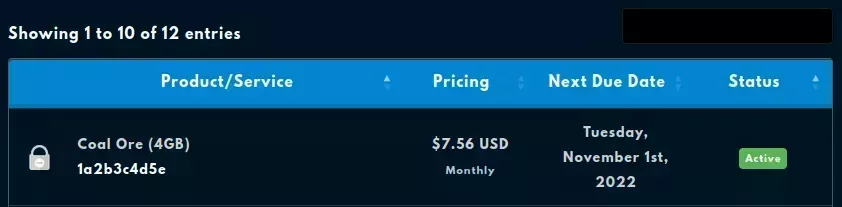
Select the Service you wish to cancel.
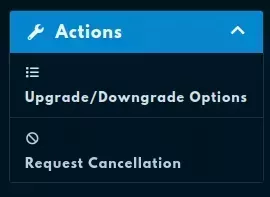
Select “Request Cancellation” from the “Actions” tab.
Provide a reason for the cancellation and confirm your request.
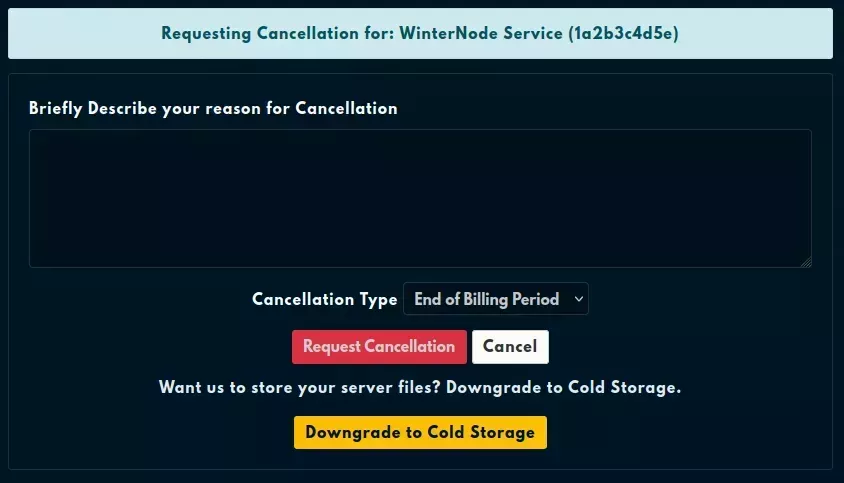
Once you’ve clicked on the Request Cancellation button, you’ll see the following message. Your cancellation request will be fulfilled at the end of your Billing Cycle, depending on when our automatic processing begins. You’ll receive an email titled WinterNode Cancellation Request Confirmation, providing details on when your service will be cancelled and any further steps that may be required.

Frequently Asked Questions
No, cancelling does not trigger a refund. You keep access until the end of the billing cycle you already paid for. First purchases within 48 hours can request a refund via a Billing Ticket instead. See the Billing and Payments FAQ.
At the end of your current billing cycle. You keep access to your server until then. You'll receive a Cancellation Request Confirmation email with the exact end date.
Yes, with Cold Storage. It pauses billing and preserves your files until you want to come back. See the Cold Storage article.
No. Your data is retained until your cancellation processes at the end of your billing cycle. Take a backup before then if you want to keep anything off our servers.
No. When the 48 hour trial ends, the server is suspended automatically and stops running. The service stays on your account, so you can upgrade it to a paid plan whenever you're ready.